
Fast Maya Customizer - Maya 2024+



DESCRIPTION
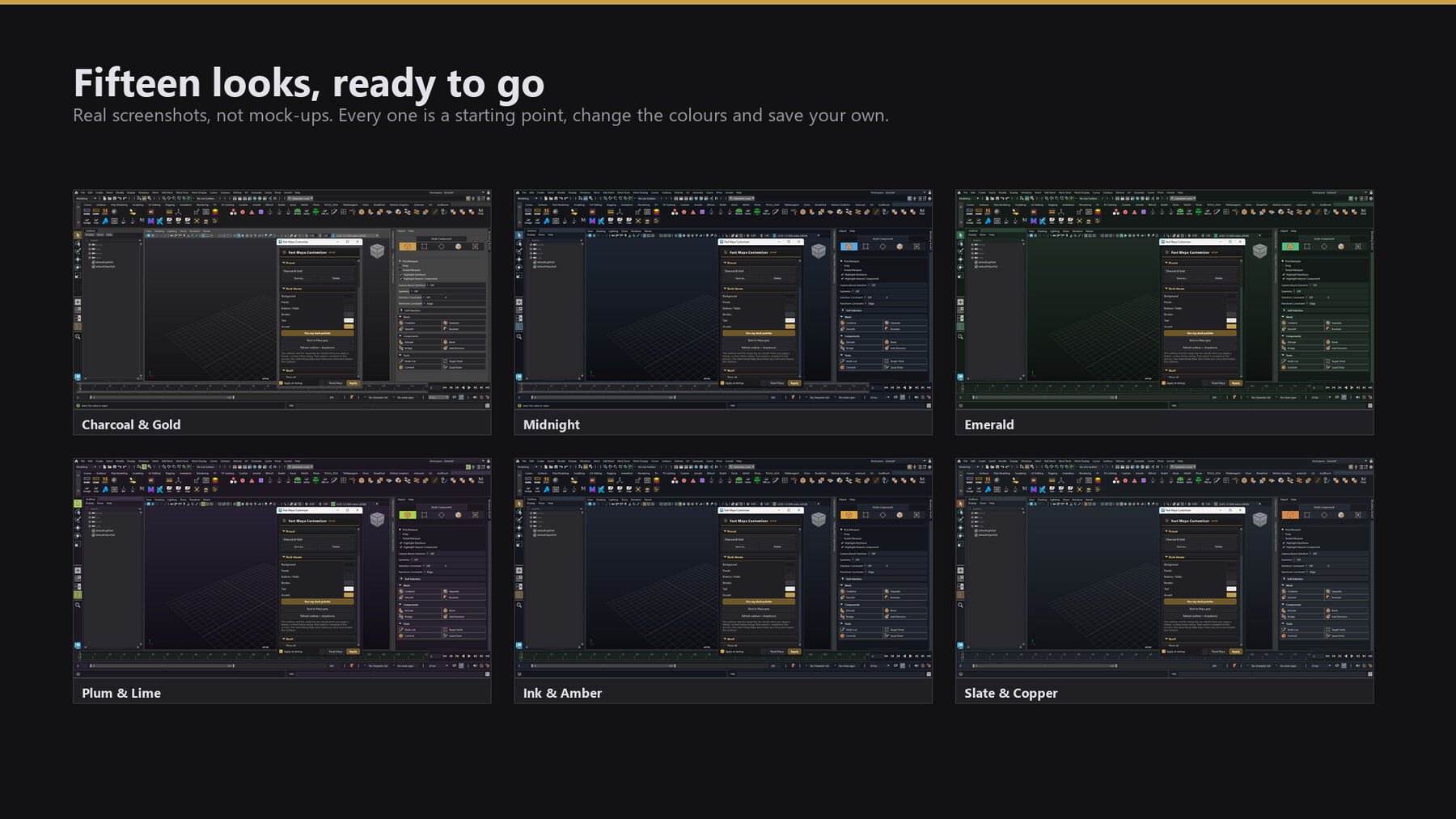
Maya's interface is grey, and most theming scripts only reach the easy half of it. Fast Maya Customizer goes after the rest: the outliner, the Modeling Toolkit, the channel box, the Attribute Editor, menus and dropdowns, the shelf, and the playback range bar etc. Pick one of fifteen themes, or set six colours and save your own. One click applies it. One click puts Maya back to factory.
WHAT YOU GET
• 15 built-in themes, and unlimited presets of your own
• Shelf row count and icon size, without rewriting your shelf files
• Your own splash image behind Maya at startup (optional)
• Apply at startup: the theme comes back every time Maya opens
• Reset Maya: factory colours, in one click
• Illustrated manual included, opened from the panel
BUILT TO BE SAFE AROUND YOUR WORK
• Never touches scene data: no objects, shaders, attributes or overrides
• Never saves your shelves or rewrites shelf files
• Never reaches the network, phones home, or collects telemetry
• No admin rights, unless you tick the optional splash-install box
• Ships as readable, commented Python. Nothing compiled or obfuscated
REQUIREMENTS
Autodesk Maya 2024 and newer, on Windows. Pure Python, using the Qt binding Maya already ships: PySide2 in 2024, PySide6 in 2025 and 2026, from the same file. Nothing to install alongside it.
Built and used daily in Maya 2024. Installed and checked in Maya 2026.
INSTALL
Unzip anywhere, drag the installer into Maya, or run the two-line snippet in
the manual. Nothing is copied into Maya's program folder.
LICENCE
One licence per artist; install on every machine you personally work on. Studio licences available on request. Everything you make with it is yours, with no attribution required.
This seller has created their own End User License Agreement. Please take a moment to read over the custom terms and conditions.
Click here to read the custom EULAEnd-User License Agreement
Copyright © 2026 Sebastian Lüdke. Alle Rechte vorbehalten. / All rights reserved.
Kontakt / Contact: sluedke3d@gmail.com
Diese Lizenz gilt für das Software-Tool, dem sie beiliegt (die „Software"), einschließlich Skripten, Benutzeroberfläche, Dokumentation und Installer, veröffentlicht von Sebastian Lüdke (der „Autor"). Es gelten die deutsche und die englische Fassung; bei Auslegungsfragen ist die deutsche Fassung maßgeblich.
This license governs the software tool it accompanies (the "Software"), including its scripts, user interface, documentation and installer, published by Sebastian Lüdke (the "Author"). The German and English versions apply equally; in case of conflicting interpretation the German version prevails.
DEUTSCHE FASSUNGIN KURZFORM (unverbindliche Zusammenfassung, es gilt der Text unten)
• Du darfst die Software auf deinen eigenen Rechnern benutzen, privat und kommerziell, und alles behalten, was du damit machst.
• Du darfst sie nicht weitergeben, weiterverkaufen, hochladen oder unter eigenem Namen veröffentlichen.
• Sie ändert nur das Aussehen von Mayas Oberfläche. Sie fasst deine Szenen, Shader und Shelf-Dateien nicht an und geht nicht ins Netz. Was genau sie schreibt, steht vollständig in Ziffer 12.
• Teile des Codes sind KI-gestützt entstanden, geprüft und getestet vom Autor (Ziffer 5).
• Sie wird „wie besehen" bereitgestellt: keine Zusicherung, dass sie fehlerfrei läuft, mit künftigen Maya-Versionen funktioniert oder zuverlässig verfügbar ist (Ziffern 6 und 7).
• Der Autor haftet nur in dem Rahmen, den das Gesetz zwingend vorschreibt. Mach Backups deiner Szenen.
• Verkauf und Erstattung laufen über ArtStation. Diese Lizenz regelt nur die Nutzung.
Der Autor ist ein freiberuflicher 3D-Artist, kein Unternehmen. Support erfolgt nach bestem Bemühen, ohne Anspruch auf Reaktionszeiten. Mit Kauf, Download, Installation oder Nutzung der Software stimmst du den folgenden Bedingungen zu.
1. LIZENZGEWÄHRUNG
Der Autor gewährt dir eine persönliche, nicht-exklusive, nicht übertragbare, weltweite Lizenz zur Installation und Nutzung der Software.
• Eine gekaufte Lizenz gilt für EINEN Artist (ein „Seat"). Der lizenzierte Artist darf die Software auf allen Rechnern installieren, an denen er selbst arbeitet (z. B. Workstation und Laptop).
• Studios und Teams: pro nutzendem Artist eine Lizenz erwerben.
• Die Nutzung in persönlichen, schulischen und KOMMERZIELLEN Projekten ist uneingeschränkt erlaubt.
2. DEINE ERGEBNISSE GEHÖREN DIR
Alles, was du MIT der Software erstellst (Meshes, Szenen, Renderings, Game-Assets, Animationen und jede andere Ausgabe), gehört vollständig dir. Für die private wie kommerzielle Nutzung dieser Ergebnisse sind weder Namensnennung noch Abgaben erforderlich.
3. EINSCHRÄNKUNGEN
Nicht gestattet ist:
• die Software oder Teile davon weiterzuverbreiten, weiterzuverkaufen, unterzulizenzieren, zu vermieten oder zu verleihen;
• die Software öffentlich (Uploads, Torrents, „Free-Script"-Sammlungen, öffentliche Repositories) oder privat über die lizenzierten Seats hinaus weiterzugeben;
• Copyright-Hinweise oder diese Lizenz zu entfernen oder zu verändern;
• abgeleitete Tools zu veröffentlichen, die wesentliche Teile des Quellcodes der Software neu verpacken.
Angemessene studio-interne Anpassungen (Pipeline-Integration, Shelf-Buttons, Preset-Dateien) sind für lizenzierte Seats erlaubt und verbleiben im Haus.
4. UPDATES UND SUPPORT
Updates, Fixes und Support erfolgen nach Ermessen des Autors über die Marketplace-Seite, auf der die Software erworben wurde. Ein Anspruch auf zukünftige Versionen besteht nicht.
5. KI-UNTERSTÜTZTE ENTWICKLUNG, TRANSPARENZ UND URHEBERSCHAFT
Idee, Konzept und Anwendungsdesign der Software (ihr Funktionsumfang, ihre Workflows und ihr Bedienkonzept ebenso wie die zugrunde liegenden Verbesserungs- und Lösungsansätze) stammen vom Autor. Bei der technischen Umsetzung kamen KI-Werkzeuge unterstützend zum Einsatz (KI-gestützte Code-Erstellung), nach den Vorgaben und unter der Anleitung des Autors. Die Anwendung wurde vom Autor umfangreich in der Praxis getestet und wird von ihm verantwortet und vertrieben. Dieser Hinweis erfolgt im Sinne der Transparenzanforderungen der Verordnung (EU) 2024/1689 („EU AI Act").
Ausdrücklich klargestellt: Teile des Quellcodes dieser Software wurden KI-gestützt erstellt (KI-unterstützte Codegenerierung). Auswahl, Vorgabe, Anleitung, Prüfung, Anpassung und Test dieser Teile erfolgten durch den Autor; die Verantwortung für das Produkt liegt beim Autor.
AUS DER KI-UNTERSTÜTZUNG ERGIBT SICH KEINE ZUSÄTZLICHE ZUSICHERUNG, GARANTIE ODER BESCHAFFENHEITSVEREINBARUNG. INSBESONDERE WIRD NICHT ZUGESICHERT, DASS KI-GESTÜTZT ERSTELLTE BESTANDTEILE FEHLERFREI SIND. Die Ziffern 6 (Keine Gewährleistung) und 7 (Haftungsbeschränkung) gelten für sie uneingeschränkt.
6. KEINE GEWÄHRLEISTUNG
DIE SOFTWARE WIRD „WIE BESEHEN" („AS IS") BEREITGESTELLT, OHNE GEWÄHRLEISTUNG JEGLICHER ART, AUSDRÜCKLICH ODER STILLSCHWEIGEND, EINSCHLIESSLICH (ABER NICHT BESCHRÄNKT AUF) MARKTGÄNGIGKEIT, EIGNUNG FÜR EINEN BESTIMMTEN ZWECK UND NICHTVERLETZUNG VON RECHTEN DRITTER. DIE NUTZUNG ERFOLGT AUF EIGENES RISIKO. LEGE STETS BACKUPS DEINER SZENEN AN.
KEINE ZUSICHERUNG VON ZUVERLÄSSIGKEIT, VERFÜGBARKEIT ODER KOMPATIBILITÄT: Der Autor sichert nicht zu, dass die Software ununterbrochen, fehlerfrei oder in jeder Umgebung zuverlässig läuft. Nicht zugesichert werden insbesondere die Lauffähigkeit mit künftigen Versionen, Updates oder Service Packs von Autodesk Maya, das Zusammenwirken mit anderen Plug-ins, Skripten, Studio-Pipelines, Betriebssystemen oder Hardware sowie die Reproduzierbarkeit einzelner Ergebnisse auf anderen Systemen.
Abbildungen, Screenshots, Videos, Vorschaubilder und sonstige Werbe- oder Demonstrationsmaterialien dienen der Veranschaulichung. Sie sind weder Beschaffenheitsvereinbarung noch Garantie. Eine Garantie übernimmt der Autor nur, soweit sie ausdrücklich und schriftlich als „Garantie" bezeichnet ist.
Zwingende gesetzliche Rechte, insbesondere Verbraucherrechte und die gesetzlichen Gewährleistungsrechte für digitale Produkte (§§ 327 ff. BGB), bleiben von dieser Lizenz unberührt.
7. HAFTUNGSBESCHRÄNKUNG
DER AUTOR HAFTET NICHT FÜR ANSPRÜCHE, SCHÄDEN ODER SONSTIGE VERBINDLICHKEITEN (EINSCHLIESSLICH ENTGANGENER GEWINNE, DATENVERLUST ODER PROJEKTVERZÖGERUNGEN) AUS DER NUTZUNG ODER NICHTNUTZBARKEIT DER SOFTWARE, AUCH WENN AUF DIE MÖGLICHKEIT SOLCHER SCHÄDEN HINGEWIESEN WURDE. WO EIN SOLCHER AUSSCHLUSS UNZULÄSSIG IST, IST DIE HAFTUNG AUF DEN GEZAHLTEN LIZENZPREIS BEGRENZT. DIE HAFTUNG FÜR VORSATZ, GROBE FAHRLÄSSIGKEIT SOWIE FÜR SCHÄDEN AN LEBEN, KÖRPER UND GESUNDHEIT BLEIBT UNBERÜHRT.
Bei einfacher Fahrlässigkeit haftet der Autor nur für die Verletzung wesentlicher Vertragspflichten (Kardinalpflichten), also solcher Pflichten, deren Erfüllung die ordnungsgemäße Durchführung des Vertrags überhaupt erst ermöglicht und auf deren Einhaltung der Nutzer regelmäßig vertrauen darf; die Haftung ist in diesem Fall der Höhe nach auf den vertragstypischen, vorhersehbaren Schaden begrenzt.
DER AUTOR ÜBERNIMMT INSBESONDERE KEINE VERANTWORTUNG FÜR SCHÄDEN AUS UNSACHGEMÄSSER, ZWECKFREMDER ODER FEHLERHAFTER NUTZUNG DER SOFTWARE SOWIE FÜR BESCHÄDIGTE, ÜBERSCHRIEBENE, ZERSTÖRTE ODER VERLORENE SZENEN, DATEIEN UND PROJEKTDATEN. Die Verantwortung für Datensicherung (Backups) und für die Prüfung der Ergebnisse vor dem Produktionseinsatz liegt allein beim Nutzer.
DIE HAFTUNG FÜR DIE ZUVERLÄSSIGKEIT DER SOFTWARE, insbesondere für Betriebsunterbrechungen, Ausfallzeiten, Produktionsverzögerungen, Mehraufwand, Nacharbeit oder entgangene Aufträge, IST IM GESETZLICH ZULÄSSIGEN UMFANG AUSGESCHLOSSEN. Dies gilt auch für die KI-gestützt erstellten Bestandteile nach Ziffer 5.
8. DRITTSOFTWARE
Die Software ist in reinem Python geschrieben und bündelt keine Bibliotheken von Drittanbietern. Sie läuft innerhalb von Autodesk Maya und nutzt die mit Maya ausgelieferten Qt-Bindings (PySide2/PySide6). Autodesk und Maya sind Marken von Autodesk, Inc. Der Autor steht in keiner Verbindung zu Autodesk und wird nicht von Autodesk unterstützt.
9. BEENDIGUNG
Diese Lizenz endet automatisch bei Verstoß gegen ihre Bedingungen. Nach Beendigung sind alle Kopien der Software zu löschen. Die Abschnitte 2, 6 und 7 gelten fort.
10. ANWENDBARES RECHT
Es gilt das Recht der Bundesrepublik Deutschland unter Ausschluss des Kollisionsrechts. Ist der Nutzer Verbraucher, bleiben die zwingenden Verbraucherschutzvorschriften seines Aufenthaltsstaates unberührt.
11. RÜCKGABE UND WIDERRUF
Der Kauf läuft über den ArtStation Marketplace. Für Rückgabe, Widerruf und Erstattung gelten die Bedingungen von ArtStation als Vertragspartner des Kaufs; wende dich in diesen Fällen bitte dorthin. Zwingende Verbraucherrechte bleiben unberührt.
12. WAS DIESE SOFTWARE ANFASST (FÜR DIE PRÜFUNG IM STUDIO)
Dieser Abschnitt ist beschreibend und keine Gewährleistung. Er schränkt die Ziffern 6 und 7 nicht ein.
Die Software ändert das Aussehen der Maya-Oberfläche. Nach bestem Wissen des Autors tut sie Folgendes und sonst nichts:
SIE SCHREIBT
• ihre eigene Einstellungsdatei (eine einzelne JSON-Datei neben den Maya-Voreinstellungen)
• Farben der Maya-Oberfläche über Mayas eigene Befehle und über Qt: die Anwendungspalette, Stylesheets einzelner Widgets, displayRGBColor sowie die Farb-Flags von Maya-Controls (frameLayout, iconTextButton, channelBox, control)
• sie BAUT beim Anwenden eines Farbschemas zwei Maya-Panels NEU: den Outliner und die Wiedergabe-Bereichsleiste. Beide lesen ihre Farben nur in dem Moment, in dem Maya sie erzeugt; ein Neuaufbau ist deshalb der einzige Weg, sie ohne Neustart zu ändern. Maya vergibt den Namen des neuen Panels aus einem Zähler, der nur hochzählt, aus outlinerPanel1 kann also outlinerPanel8 werden, genau das passiert auch, wenn ein Nutzer den Outliner von Hand schließt und wieder öffnet. Ein Studio-Skript, das den alten Panelnamen fest verdrahtet, findet ihn bis zum Maya-Neustart nicht mehr. Die Einstellungen des Outliner-Editors werden übernommen; aufgeklappte Zweige und die Scrollposition nicht.
• Mayas Startbilder (Splash), NUR wenn der Nutzer ein Bild auswählt und die Schaltfläche drückt, und erst nachdem Mayas eigene Bilder gesichert wurden. Ist Mayas Ordner schreibgeschützt, sagt die Software das und kopiert nichts.
Eine Ausnahme, standardmäßig aus und nie automatisch: Setzt der Nutzer den Haken „Administratorrechte zum Installieren verwenden", fordert die Software bei Windows eine einzelne Rechteerhöhung an und führt einen reinen Kopierbefehl aus (eine .cmd-Datei aus „copy"-Zeilen, gestartet über ShellExecuteW „runas"). Es ist kein Skript-Interpreter beteiligt und keine Ausführungsrichtlinie wird umgangen. Die ausgeführte Datei bleibt zum Nachlesen auf der Festplatte liegen.
SIE TUT NICHT
• eine Shell öffnen, einen Prozess starten oder Rechte anfordern, außer für das oben beschriebene Kopieren des Splash-Bildes, und nur mit gesetztem Haken
• das Netzwerk benutzen, „nach Hause telefonieren" oder Telemetrie erheben
• Szenendaten lesen, schreiben oder löschen: keine Attribute, keine Shader, keine Objekte, keine Anzeige-Überschreibungen
• Shelves selbst speichern oder Shelf-Dateien direkt schreiben. Sie setzt über Mayas eigene Befehle zwei Shelf-EIGENSCHAFTEN, und nur auf Anforderung: die Symbolgröße und die Beschriftungsfarbe von Shelf-Schaltflächen. Maya schreibt diese Werte fest, wenn Maya seine Shelves das nächste Mal speichert
• beim Maya-Start irgendetwas einrichten, solange der Nutzer nicht „Beim Start anwenden" ankreuzt. Dann wird ein klar markierter Block in userSetup.py geschrieben und beim Abwählen wieder entfernt
UMKEHRBAR, UND WAS DIE SITZUNG ÜBERDAUERN KANN
Reset stellt Mayas eigene Farben aus Werten wieder her, die vor der ersten Änderung erfasst wurden, und setzt die Schriftart der Oberfläche zurück.
Ehrlich angemerkt, weil eine frühere Fassung dieses Abschnitts das nicht tat: MAYA SELBST sichert einen Teil dessen, was die Software ändert. Maya schreibt seine Anzeigefarben (displayRGBColor) und seinen Shelf-Zustand beim Beenden in die eigenen Voreinstellungsdateien. Eine Farbe, die die Software gesetzt und Maya anschließend gespeichert hat, kann deshalb in spätere Sitzungen überdauern, auch wenn die Software entfernt wurde. Ein Reset innerhalb von Maya setzt diese Werte auf Autodesks Werkseinstellungen zurück; ein geänderter und ohne Reset von Maya gespeicherter Wert bleibt, bis er zurückgesetzt wird.
Studios, die das nachprüfen möchten, sind ausdrücklich eingeladen, den Quelltext zu lesen: Er wird unkompiliert und kommentiert ausgeliefert, genau zu diesem Zweck.
IN SHORT (non-binding summary, the text below governs)
• You may use the Software on your own machines, privately and commercially, and everything you make with it stays yours.
• You may not pass it on, resell it, upload it or publish it under your own name.
• It changes the look of Maya's interface only. It does not touch your scenes, shaders or shelf files, and it does not go online. Exactly what it writes is set out in full in section 12.
• Parts of the code were written with AI assistance, reviewed and tested by the Author (section 5).
• It is provided "as is": no assurance that it runs error free, works with future Maya versions, or is reliably available (sections 6 and 7).
• The Author is liable only as far as the law requires. Keep backups of your scenes.
• Sales and refunds run through ArtStation. This licence governs use only.
The Author is a freelance 3D artist, not a company. Support is on a best-effort basis, with no guaranteed response times.
By purchasing, downloading, installing or using the Software you agree to the terms below.
1. LICENSE GRANT
The Author grants you a personal, non-exclusive, non-transferable, worldwide license to install and use the Software.
• One purchased license covers ONE artist (a "seat"). The licensed artist may install the Software on any machines they personally work on (e.g. workstation and laptop).
• Studios and teams: purchase one license per artist using the Software.
• You may use the Software in personal, educational and COMMERCIAL projects without restriction.
2. YOUR OUTPUT IS YOURS
Everything you create WITH the Software (meshes, scenes, renders, game assets, animations and any other output) belongs entirely to you. No attribution is required, and no royalties are owed, for any personal or commercial use of that output.
3. RESTRICTIONS
You may NOT:
• redistribute, resell, sublicense, rent, lease or lend the Software or any part of it;
• share the Software publicly (uploads, torrents, "free script" collections, public repositories) or privately beyond the licensed seat(s);
• remove or alter copyright notices or this license;
• release derivative tools that repackage substantial parts of the Software's source code.
Reasonable studio-internal adjustments (pipeline integration, shelf buttons, preset files) are permitted for licensed seats and must stay in-house.
4. UPDATES AND SUPPORT
Updates, fixes and support are provided at the Author's discretion through the marketplace page the Software was purchased from. There is no obligation to provide future versions.
5. AI-ASSISTED DEVELOPMENT, TRANSPARENCY AND AUTHORSHIP
The idea, concept and application design of the Software (its feature set, its workflows and its user experience, as well as the underlying improvement and solution approaches) originate from the Author. AI tools were used to assist with the technical implementation (AI-assisted code generation), following the Author's specifications and direction. The application has been extensively tested in practice by the Author, who publishes it and remains responsible for it. This notice is provided in the spirit of the transparency requirements of Regulation (EU) 2024/1689 (the "EU AI Act").
Stated explicitly: parts of this Software's source code were produced with AI assistance (AI-assisted code generation). The selection, specification, direction, review, adaptation and testing of those parts were carried out by the Author, and responsibility for the product rests with the Author.
NO ADDITIONAL ASSURANCE, GUARANTEE OR AGREED QUALITY ARISES FROM THAT AI ASSISTANCE. IN PARTICULAR, IT IS NOT ASSURED THAT AI-ASSISTED PARTS ARE FREE OF DEFECTS. Sections 6 (No Warranty) and 7 (Limitation of Liability) apply to them without restriction.
6. NO WARRANTY
THE SOFTWARE IS PROVIDED "AS IS", WITHOUT WARRANTY OF ANY KIND, EXPRESS OR IMPLIED, INCLUDING BUT NOT LIMITED TO THE WARRANTIES OF MERCHANTABILITY, FITNESS FOR A PARTICULAR PURPOSE AND NON-INFRINGEMENT. YOU USE THE SOFTWARE AT YOUR OWN RISK. ALWAYS KEEP BACKUPS OF YOUR SCENES.
NO ASSURANCE OF RELIABILITY, AVAILABILITY OR COMPATIBILITY: The Author does not assure that the Software runs uninterrupted, error free, or reliably in every environment. In particular, no assurance is given as to operation with future versions, updates or service packs of Autodesk Maya, interoperation with other plug-ins, scripts, studio pipelines, operating systems or hardware, or the reproducibility of any individual result on another system.
Images, screenshots, videos, previews and other promotional or demonstration material are illustrative. They are neither an agreed quality nor a guarantee. The Author gives a guarantee only where it is expressly designated as a "guarantee" in writing.
Mandatory statutory rights, in particular consumer rights and the statutory warranty rights for digital products, remain unaffected by this license.
7. LIMITATION OF LIABILITY
IN NO EVENT SHALL THE AUTHOR BE LIABLE FOR ANY CLAIM, DAMAGES OR OTHER LIABILITY (INCLUDING LOST PROFITS, LOST DATA OR PROJECT DELAYS) ARISING FROM THE USE OF OR INABILITY TO USE THE SOFTWARE, EVEN IF ADVISED OF THE POSSIBILITY OF SUCH DAMAGES. WHERE SUCH EXCLUSION IS NOT PERMITTED, LIABILITY IS LIMITED TO THE AMOUNT PAID FOR THE LICENSE. LIABILITY FOR INTENT, GROSS NEGLIGENCE AND INJURY TO LIFE, BODY OR HEALTH REMAINS UNAFFECTED.
In cases of ordinary negligence the Author is liable only for the breach of essential contractual obligations (obligations whose fulfilment makes the proper performance of this agreement possible in the first place and on whose observance the user may regularly rely); in such cases liability is limited to the foreseeable damage typical for this kind of agreement.
IN PARTICULAR, THE AUTHOR ACCEPTS NO RESPONSIBILITY FOR DAMAGE CAUSED BY IMPROPER, UNINTENDED OR INCORRECT USE OF THE SOFTWARE, NOR FOR DAMAGED, OVERWRITTEN, DESTROYED OR LOST SCENES, FILES OR PROJECT DATA. Responsibility for data backups and for validating results before production use rests solely with the user.
LIABILITY FOR THE RELIABILITY OF THE SOFTWARE, in particular for interruptions of operation, downtime, production delays, additional effort, rework or lost commissions, IS EXCLUDED TO THE EXTENT PERMITTED BY LAW. This applies equally to the AI-assisted parts described in section 5.
8. THIRD-PARTY SOFTWARE
The Software is written in pure Python and bundles no third-party libraries. It runs inside Autodesk Maya and uses the Qt bindings that ship with Maya (PySide2/PySide6). Autodesk and Maya are trademarks of Autodesk, Inc. The Author is not affiliated with or endorsed by Autodesk.
9. TERMINATION
This license terminates automatically if you breach its terms. Upon termination you must delete all copies of the Software. Sections 2, 6 and 7 survive termination.
10. GOVERNING LAW
This agreement is governed by the laws of the Federal Republic of Germany, without regard to conflict-of-law rules. Where the user is a consumer, the mandatory consumer-protection rules of the user's country of residence remain unaffected.
11. REFUNDS AND WITHDRAWAL
The purchase runs through the ArtStation Marketplace. Refunds, returns and any right of withdrawal are handled by ArtStation as the merchant of record, under its terms. Please go to them for those. Mandatory consumer rights are unaffected.
12. WHAT THIS SOFTWARE TOUCHES (FOR STUDIO REVIEW)
This section is descriptive, not a warranty. Nothing in it limits sections 6 and 7.
The Software changes the appearance of Maya's interface. To the best of the Author's knowledge it does the following, and nothing else:
WRITES
• its own preferences file (a single JSON file beside Maya's prefs)
• Maya interface colours through Maya's own commands and Qt: the application palette, per-widget stylesheets, displayRGBColor, and the colour flags of Maya controls (frameLayout, iconTextButton, channelBox, control)
• REBUILDS two Maya panels when a theme is applied: the Outliner and the playback range control. Both read their colours only at the moment Maya builds them, so rebuilding is the only way to change them without restarting. Maya names the new panel from a counter that only counts up, so outlinerPanel1 can come back as outlinerPanel8, exactly what happens when a user closes and reopens the Outliner by hand. A studio script that hard-codes the old panel name will not find it again until Maya restarts. What the outliner editor remembers is carried across; its expansion and scroll position are not.
• Maya's startup splash images, ONLY when the user picks an image and presses the button, and only after backing up Maya's own images. Where Maya's folder is read-only the Software says so and copies nothing.
One exception, off by default and never automatic: if the user ticks "Use administrator rights to install it", the Software asks Windows for a single elevation prompt and runs a plain copy command (a .cmd of "copy" lines, started through ShellExecuteW "runas"). No script interpreter is involved and no execution policy is bypassed. The file it runs is left on disk to be read.
DOES NOT
• open a shell, start a process, or request elevation, except for the splash copy above, and only with that box ticked
• touch the network, phone home, or collect telemetry
• read, write or delete scene data of any kind: no attributes, no shaders, no objects, no display overrides
• save shelves itself, or write shelf files directly. It does set two shelf PROPERTIES through Maya's own commands, and only when asked: the icon size, and the caption colour on shelf buttons. Maya persists those when Maya next saves its shelves
• install anything at Maya startup unless the user ticks "Apply at startup", which writes one clearly marked block into userSetup.py and removes it again when unticked
REVERSIBLE, AND WHAT CAN OUTLIVE THE SESSION
Reset restores Maya's own colours from values captured before the first change, and puts Maya's interface font back.
Note honestly, because an earlier version of this section did not: MAYA ITSELF saves part of what the Software changes. Maya writes its display colours (displayRGBColor) and its shelf state into its own preference files when it exits. A colour the Software set and Maya then saved can therefore persist into later sessions, even with the Software removed. Reset inside Maya puts those values back to Autodesk's factory values; a value changed and then saved by Maya without a Reset stays until it is reset.
Studios who wish to verify the above are encouraged to read the source, which ships uncompiled and commented for that purpose.
VERKAUF / HOW THIS IS SOLD
Autor / Author: Sebastian Lüdke, freiberuflicher 3D-Artist
Support: sluedke3d@gmail.com
Der Vertrieb erfolgt über den ArtStation Marketplace. ArtStation ist dabei Vertragspartner des Kaufs und wickelt Zahlung, Umsatzsteuer, Rechnung sowie Rückgabe/Widerruf nach den dortigen Bedingungen ab. Diese Lizenz regelt ausschließlich die NUTZUNG der Software.
Sold through the ArtStation Marketplace. ArtStation is the merchant of record and handles payment, sales tax/VAT, invoicing and refunds or withdrawal under its own terms. This licence governs only the USE of the Software.
© 2026 Sebastian Lüdke, sluedke3d@gmail.com
Stand / Last updated: 2026-08-24